
Cookie pop-ups appear on almost every website. They ask you to either accept or reject tracking. Many people click quickly without understanding what the choice actually means. Cookies themselves are not harmful. However, they can affect privacy and how websites collect data. It’s important to understand them.
What you need to know:
- Cookies are small data files that help websites remember logins and settings/preferences.
- Essential cookies are usually required for websites to function properly.
- Advertising and tracking cookies collect data about browsing behavior across sites.
- You can usually reject non-essential cookies without affecting basic website use.
- Cookie settings can be changed later through the website or browser controls.
Should you accept cookies?
There is no single right answer to the question. Accepting cookies improves convenience by remembering information like preferences and settings. Limiting cookies reduces the opportunities for tracking and protects privacy.
A practical approach many take is to accept essential cookies that keep the site working and review or decline optional tracking cookies when privacy matters. The best choice comes from weighing up how much convenience you want versus how much data sharing you are comfortable with.
What does it mean to accept cookies?
When you click “Accept,” you give the website permission to store information on your device and collect data about how you use the site. This may include login status, language preferences, browsing activity, and interactions with pages or features.
Accepting cookies can also allow the site to share certain data with analytics or advertising partners. The scope of data collection depends on the cookie categories enabled and the website’s smallprint.
What does “accept all cookies” mean?
Selecting “Accept all cookies” enables every category of cookies offered by the site. This includes third-party tracking cookies. These cookies can monitor browsing behavior across multiple websites to build usage profiles or deliver targeted advertising.
This option usually provides the smoothest website experience with personalized content. It also allows the broadest level of data collection and tracking including third-parties that are difficult to verify and check. It leaves uncertainty over the way you are being tracked.
Why do websites ask you to accept cookies?
Websites rely on cookies for core functionality. This might include performance monitoring like analytics. Some cookies keep sessions active or remember items in a shopping cart. Others measure traffic or help improve design and usability.
Advertising and marketing systems also depend on cookies to measure campaign effectiveness and show relevant content. Consent banners exist because privacy laws require websites to explain these uses and give users a choice.
How is cookie data collection regulated?
Many regions require websites to be transparent about data collection and obtain consent before using non-essential cookies. Laws tend to focus on user awareness as well as control and accountability.
The General Data Protection Regulation (GDPR) in Europe requires clear consent and allows users to withdraw permission or request deletion of personal data. In the United States, the California Consumer Privacy Act (CCPA) and California Privacy Rights Act (CPRA) give residents the right to know what data is collected and to opt out of certain data sharing.
Similar rules exist in other regions including India's Personal Data Protection Bill and Canada’s Digital Charter Implementation Act. This reflects a global shift toward stronger privacy protections.
Are cookies dangerous?
Cookies are not viruses or malware and they cannot directly damage your device. The main concern is privacy rather than security. They become more dangerous when they fall into the wrong hands.
Risk increases when cookies are stored on shared devices or used on public Wi-Fi. There are also risks when you allow them to be collected by untrusted websites. Unencrypted (HTTP) connections can also expose cookie data to interception.
Cookies are relatively low-risk in most scenarios, but managing permissions helps reduce unnecessary tracking.
What types of cookies should you accept?
Not all cookies carry the same level of risk. You can allow low-risk cookies with some level of confidence, especially from sites you trust. Cookies that stay within the same website and serve a clear purpose are the safest to allow.
You can be more confident accepting cookies that simply support security or basic usability without extensive tracking.
Cookies that are usually safe
Essential cookies are required for core website functions, such as keeping you logged in, protecting accounts, or processing payments. Without them, many sites would not work properly.
First-party cookies from trusted websites are typically used by the site you are visiting and are less likely to be shared widely. These cookies help maintain sessions and ensure stable performance.
Preference-related cookies store settings like language, location, or display preferences. They improve usability by remembering how you like the site to behave without tracking activity across multiple websites.
What types of cookies should you avoid?
Some cookies collect data primarily for marketing or sharing with external companies. These are not required for basic functionality and often provide little direct benefit to the user. Limiting these cookies can reduce tracking and help maintain greater control over personal data.
Third-party tracking cookies follow browsing activity across multiple websites. They are commonly used to build profiles of interests and behavior.
Advertising cookies support targeted ads and marketing campaigns by analyzing browsing patterns. They tend to increase the amount of data collected about you.
Cookies that share data with external partners may transmit information to analytics or advertising networks. These partnerships can expand how widely your browsing data is distributed beyond the original website.
What happens if you don’t accept cookies?
Most websites will still load and function if you reject cookies. However, declining optional cookies can change how the site behaves. You may reduce tracking and data collection, but some features may not work as smoothly.
One example is that you might need to log in more often or reselect language or region settings. It is also possible you will lose saved preferences. Shopping carts or personalized content may also reset between visits.
Rejecting cookies usually does not block access to a site, but it can make the experience less seamless.
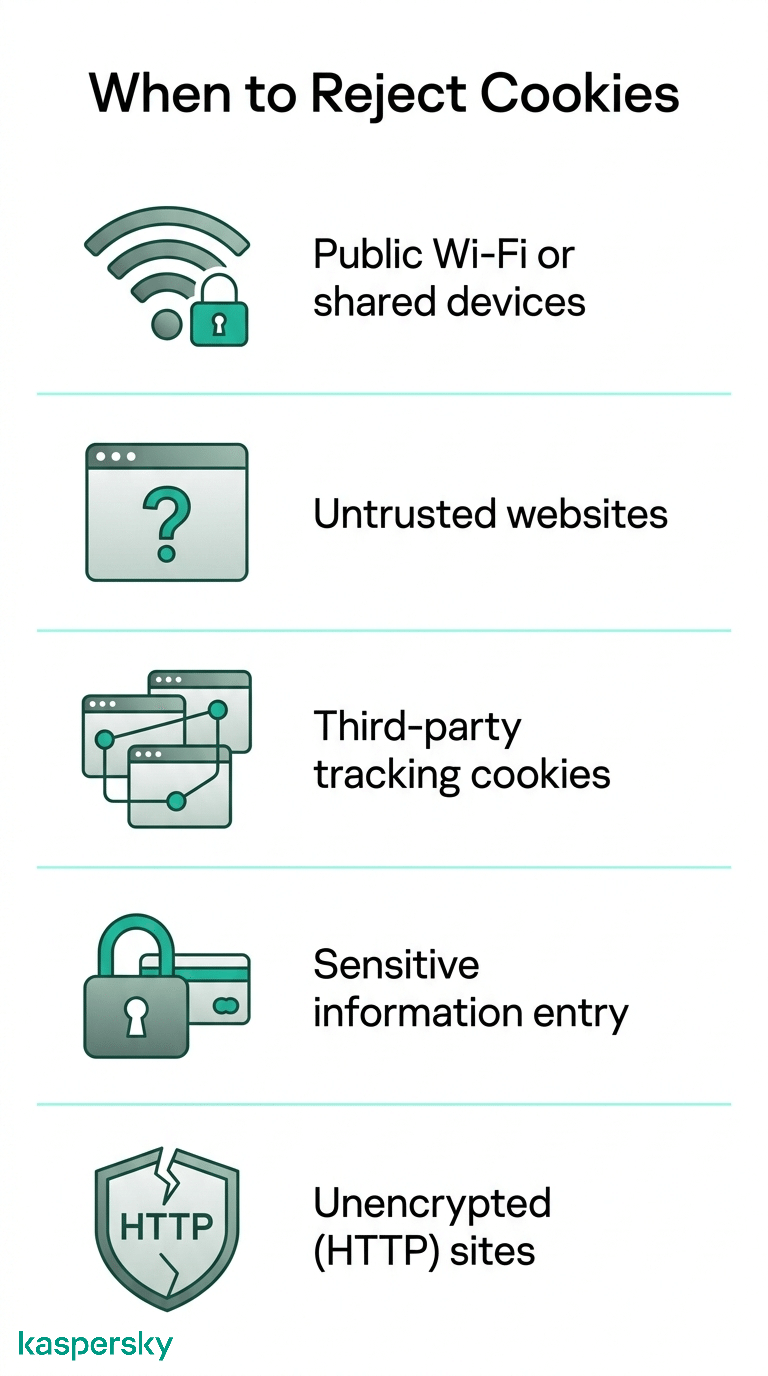
5 times you should not accept cookies
There are situations where accepting cookies can increase privacy or security risks. Rejecting or limiting cookies to only what is essential can help reduce unnecessary data exposure.
On public Wi-Fi or shared devices
Public networks and shared computers increase the chance that session data could be accessed by others. Avoid accepting unnecessary cookies, especially those used for tracking or personalization.
On untrusted or suspicious websites
Websites that lack clear trust signals like secure connections and transparent policies may collect excessive data. Avoid accepting cookies and limit interaction with these sites where possible.
When cookies include third-party tracking
Third-party cookies can track browsing activity across multiple websites to build profiles or target ads. These cookies are rarely required for basic functionality and can significantly affect privacy.
When sharing sensitive information
When logging into accounts, making payments, or entering personal data, restrict cookies to essential ones only. Limiting tracking reduces the risk of data misuse or exposure.
On unencrypted (HTTP) websites
If a website does not use HTTPS, data transmitted between your device and the site may be intercepted. Avoid accepting unnecessary cookies on these connections and consider leaving the site altogether due to weak security.
How can you reduce tracking from cookies?
Reducing tracking is less about a single click and more about consistent habits. Small adjustments to browser settings and browsing behavior can significantly limit how much data is collected over time.
These steps do not eliminate cookies entirely. They do help keep tracking to a manageable level.
Tools like a VPN can reduce tracking by masking your IP address and making it harder to link your activity across websites. Kaspersky Secure Connection helps protect your browsing data on public networks and limits how easily your activity can be tracked.
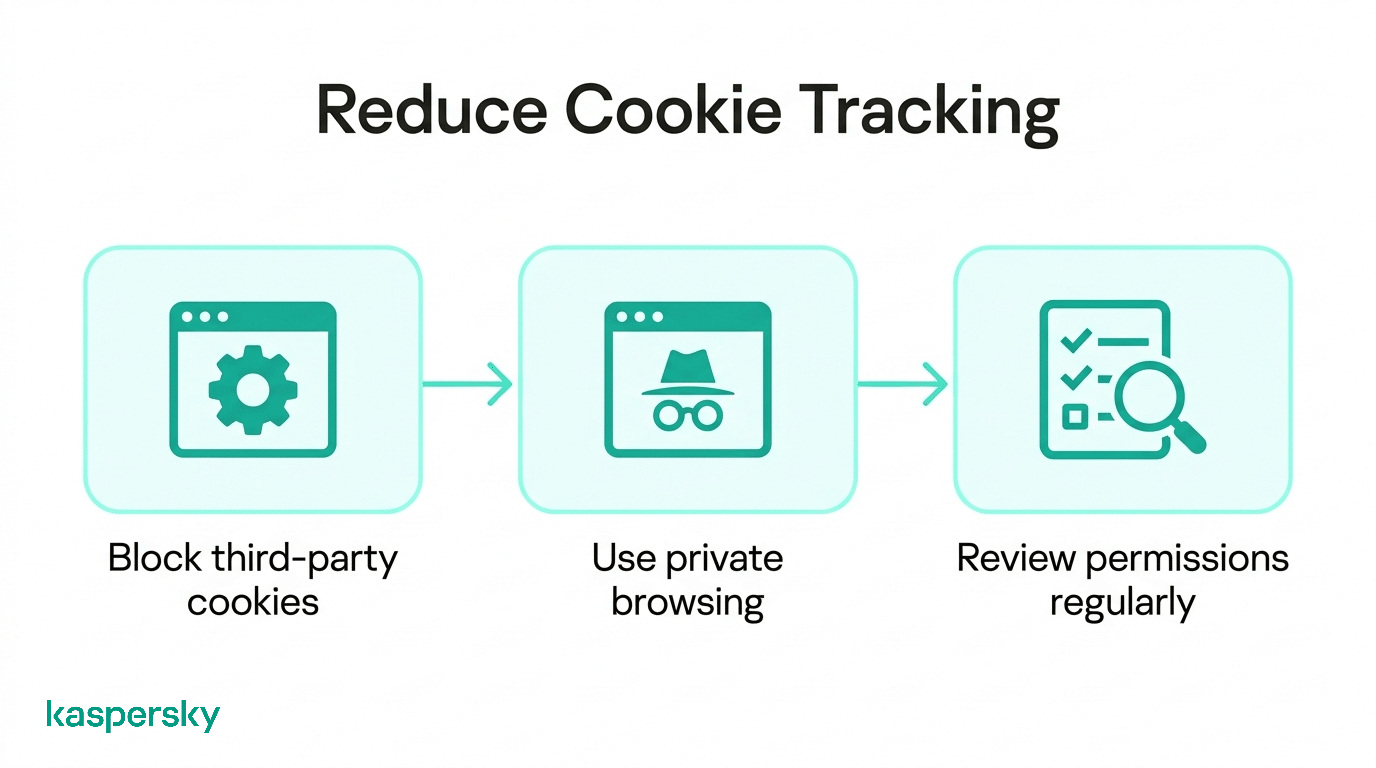
Simple ways to limit tracking
Block third-party cookies in your browser settings. This prevents many advertising and tracking systems from following your activity across multiple websites.
Use private browsing when you want to minimize stored data. Private or incognito modes limit how long cookies remain on your device after a session ends.
Review permissions regularly by checking cookie and privacy settings on frequently used websites. Removing old permissions reduces unnecessary tracking.
Protect your privacy
Kaspersky Premium offers various tools designed to protect your devices, monitor for data leaks and keep your activity private.
Try Premium for FreeWhat’s the easiest way to handle cookie pop-ups?
The simplest approach is to be consistent. Avoid clicking “Accept all” automatically unless you trust the website and understand how it uses data.
If a “Reject all” option is available, use it when privacy is the priority. If not, open the settings menu and disable optional tracking cookies while keeping essential ones enabled.
Applying the same habit across websites makes cookie decisions quicker and helps maintain control over personal data.
Related Articles:
- What are the implications of accepting cookies on your privacy?
- What are the key concerns regarding social media privacy today?
- What are the differences between incognito mode and private browsing?
- How can you prevent privacy exposure online?
Related Products:
FAQs
Are cookies required on every website?
No. Many websites can function without non-essential cookies, but most rely on essential cookies for basic features like logins and shopping carts.
Do cookies slow down your device or browser?
Usually not. Cookies are small files and rarely affect performance, although large numbers of tracking scripts on a site can sometimes slow page loading.
Can cookies track you after you leave a website?
Yes. Third-party cookies can track activity across different websites. First-party cookies typically stop working once you leave the original site.