Is it safe for employees to use personal laptops for work?
Employees can work securely from personal laptops, but only when those devices meet the right security requirements and access to company systems is properly controlled.
This approach is commonly known as BYOD (Bring Your Own Device). It allows employees to use their own laptops for work rather than relying on company-issued equipment. BYOD can make remote work more affordable and flexible, particularly for small businesses with limited IT resources. However, employees still need to follow clear security requirements when working from home.
The main difference is control. The business can usually control a lot of aspects of company-issued hardware, including being able to install security software, enforce updates, manage access, and apply the same security settings across every device. BYOD means some of that responsibility is shared with the employee. The business needs clear minimum standards before allowing access to company email, files, cloud services, or other systems.
BYOD can be a practical option when personal laptops are kept updated, protected against malware, secured with strong authentication, and used in line with company security requirements. It may be less appropriate when employees handle highly sensitive information or when a personal device cannot meet the security standards the business requires.
- BYOD allows employees to work on personal laptops, provided the devices meet company security requirements.
- Keep personal laptops updated, use reliable endpoint protection, and enable device encryption and automatic screen locking.
- The biggest BYOD challenge is that businesses have less visibility and control over personally owned devices than company-issued laptops.
- Multi-factor authentication, unique passwords, encryption, and controlled access can reduce the impact of a lost device or compromised account.
- Work information should be kept in approved company accounts and storage rather than personal services.
- BYOD may not be suitable where highly sensitive information is involved or where personal devices cannot meet the company's security standards.
What are the biggest BYOD cybersecurity risks?
The main BYOD risk is not simply that a laptop is personally owned. The problem is that businesses usually have less visibility into how personal devices are configured and used.
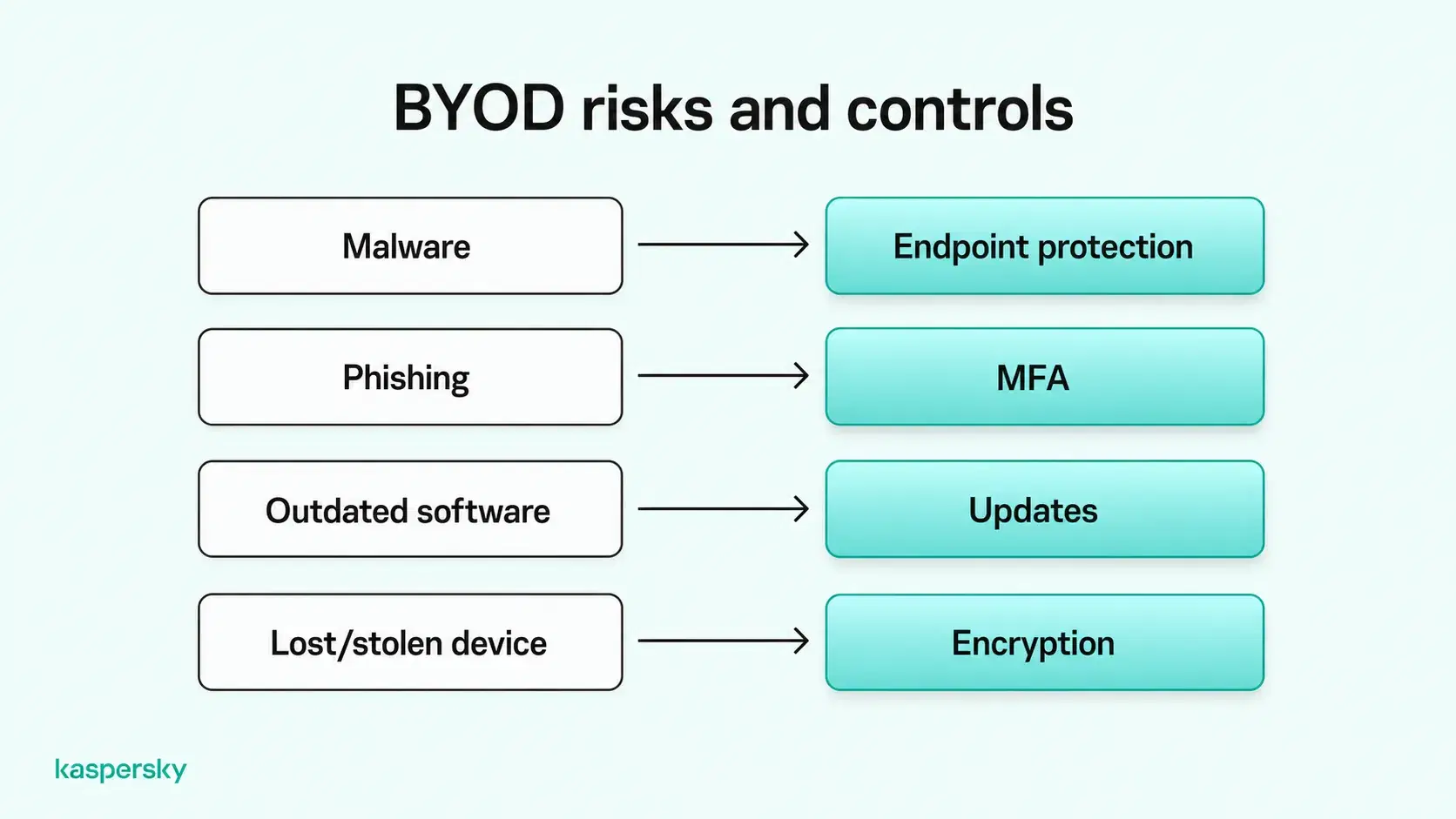
Malware and ransomware can compromise a laptop and give attackers access to business files or accounts. Phishing can lead employees to reveal credentials or install malicious software, while outdated operating systems, browsers, and applications may contain security weaknesses that have already been fixed in newer versions. Unlike company-managed devices, personal laptops often depend on employees to install updates and maintain security protections consistently.
Shared laptops create another risk. If family members or other users can access the same device, they may accidentally install unsafe software or expose company information. Using unsecured networks can also increase risk, particularly when remote access is poorly protected.
Company information can also become difficult to control when employees save it in personal cloud accounts, local folders, or unapproved applications. This makes it harder for the business to manage access or know where sensitive data is stored. This becomes particularly challenging when employees leave, as businesses may struggle to identify and remove company files stored on personal devices.
Lost or stolen laptops can expose business information too. The risk is higher when full-disk encryption, screen locks, and strong device authentication are not enabled.
These risks can vary significantly between employees, depending on their devices, software, and security habits. Establishing consistent cybersecurity requirements helps small businesses reduce these differences and protect company information more effectively.
How do you improve BYOD security for remote employees?
BYOD security works best when several basic protections are combined. Every approved personal laptop should meet a minimum standard for device security. This includes both account protection and the way company data is handled.
Improving security does not have to mean complex infrastructure. Keeping devices updated, using reliable endpoint protection, requiring strong authentication, and making sure work data stays in approved business systems can reduce many of the most common risks.
Protect devices against malware and unauthorized access
Personal laptops used for work should run supported operating systems and keep browsers and security tools up to date. Security patches are important because they fix known weaknesses that attackers may otherwise exploit.
Reliable endpoint protection should also be installed to help detect and block malware, ransomware, and other threats. This is especially important on BYOD devices because employees may also use them for personal browsing. They may download apps or other files outside the company's control.
Full-disk encryption can help protect information if a laptop is lost or stolen. Devices should also use automatic screen locking and secure authentication, such as a strong password or PIN, with biometric authentication where supported.
Secure remote access to company systems
Business email and other important accounts should be protected with multi-factor authentication (MFA). This adds another check beyond the password and can help prevent account takeover if login credentials are stolen.
Employees should use strong and unique passwords for business accounts, ideally stored in a password manager. Passkeys can provide another secure sign-in option where they are supported.
Remote workers should also use secure Wi-Fi and encrypted connections when accessing company systems. A VPN (Virtual Private Network) may be required when connecting to private company resources or when the business provides one as part of its remote-access setup. However, a VPN should be treated as one layer of protection rather than a replacement for endpoint security, MFA, or safe account practices.
Keep business and personal data separate
Work information should be stored in approved business accounts and company-managed cloud storage. For example, employees should save company documents to an approved Microsoft 365 or Google Workspace account rather than a personal cloud drive. This helps businesses control access to sensitive files.
Household members should not be able to access company information on a shared laptop. Separate user accounts can help reduce accidental access. Separate browser profiles can also make it easier to keep work and personal sign-ins apart.
These measures improve organization and reduce casual crossover between personal and business activity. They do not provide complete security isolation. If the device itself is compromised, malware may still be able to affect more than one account or profile.
How can small businesses manage BYOD security?
Small businesses can manage BYOD more effectively by setting clear rules before employees connect personal laptops to company systems.
A BYOD policy should explain which devices are allowed, the minimum security standards they must meet, which applications and services employees should use, and what employees are responsible for. It should also cover acceptable use, how company information should be stored, and what happens if a device is lost, compromised, or no longer used for work.
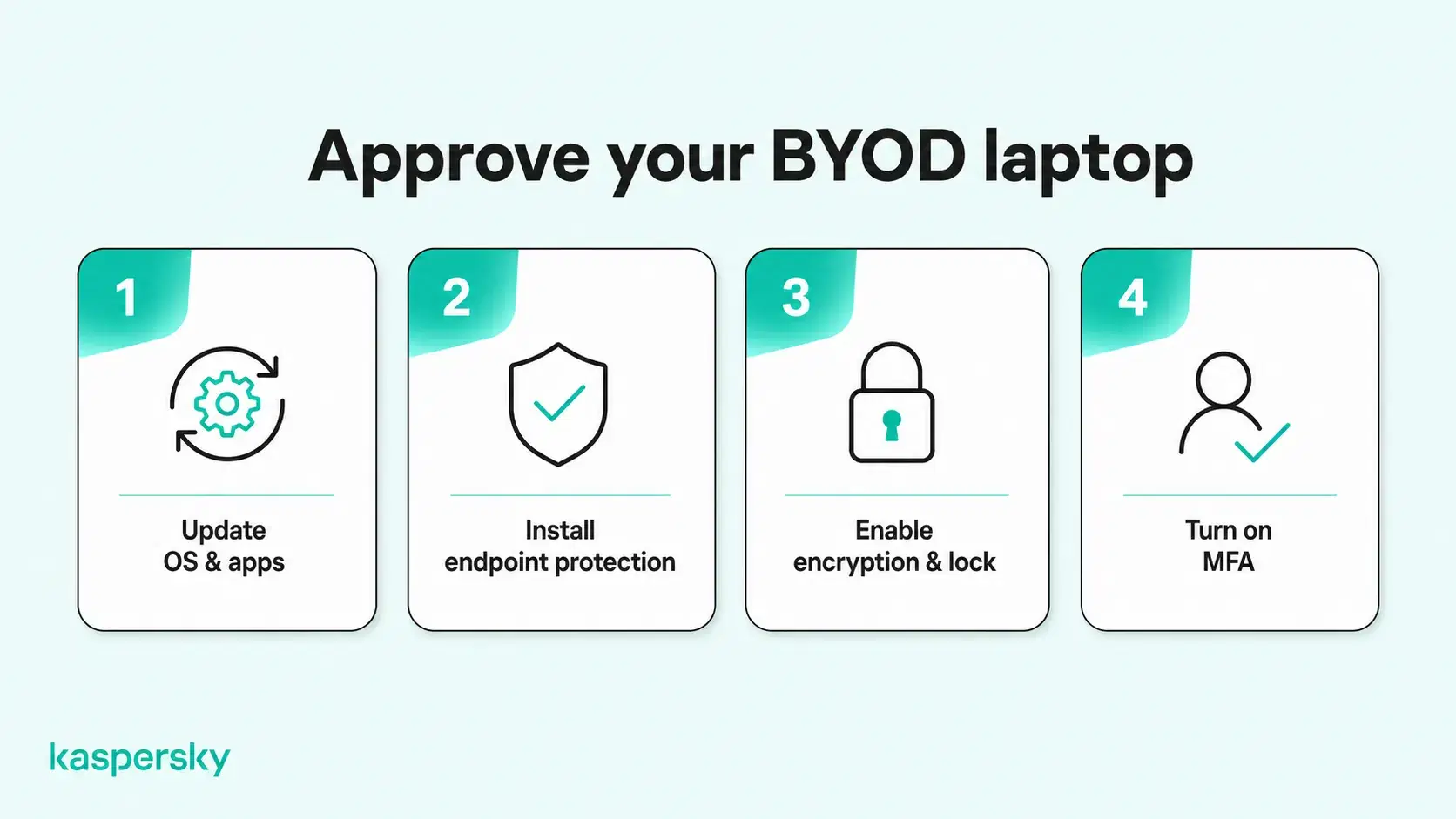
Before granting access to company systems, small businesses should verify that personal laptops meet their minimum security requirements. For example, employees could complete a device approval checklist confirming that their operating system is supported, security updates are installed, endpoint protection is active, and encryption is enabled. Periodic checks can help identify devices that no longer meet these requirements.
Access should follow the principle of least privilege. Give employees only the systems and information they need for their role. Permissions should be reviewed when responsibilities change and removed promptly when someone leaves the business. Offboarding should also address any company files that may still be stored on a personal laptop.
Centralized security tools can make this easier by helping businesses manage access and device protection from one place. Any monitoring should be limited to what is necessary for business security and should avoid unnecessary visibility into an employee's personal activity or files.
Independently tested and awarded by the industry's leading labs.



What should you do if an employee's personal laptop is compromised?
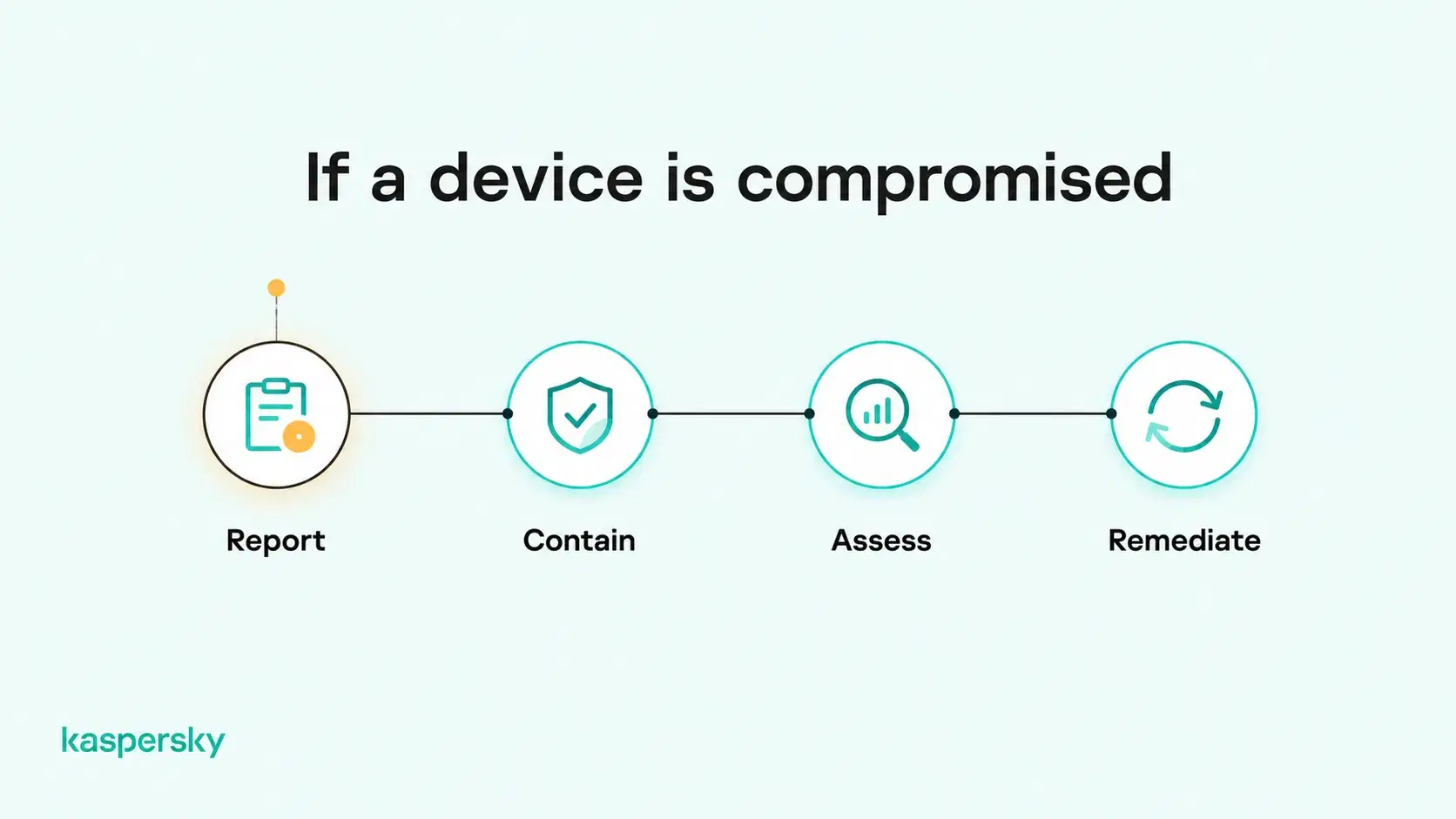
Employees should report suspected malware, unauthorized access, or a lost or stolen laptop as soon as possible. Fast reporting gives the business more time to limit access and protect affected accounts.
The first priority is containment. This may involve temporarily blocking the device from company systems, signing out active sessions, resetting affected credentials, or isolating a device that may be infected with malware.
Once the immediate threat is contained, the business should assess whether company accounts, files, or systems were exposed. Check:
- Whether company files were stored on the laptop
- Which business accounts had active sessions on the device
- Whether suspicious logins took place
- Whether the device had access to sensitive systems or cloud services.
If malware is suspected, the device should be cleaned and checked before important credentials are changed on it. Sensitive account changes should be made from a known-clean device.
A compromised personal laptop should only regain access to company systems after the security issue has been resolved and the device once again meets the company's BYOD requirements. In the case of a lost or stolen laptop, affected accounts and sessions should remain restricted until the business is satisfied that company access has been secured.
Related Articles:
- What are the risks of endpoint device vulnerabilities in BYOD environments?
- What are the key differences in Personal vs business antivirus?
- What are essential email best practices for small businesses?
- "How can a ""Guide to small business cybersecurity"" help my team?"
Related Products:
FAQs
Can employers monitor employees' personal laptops?
Yes, employers may monitor work-related activities or security settings on personal laptops, depending on applicable laws and company policies. Monitoring should be transparent, limited to legitimate business needs, and respect employee privacy.
Can a company remotely wipe an employee's personal laptop?
Yes, some device management tools allow companies to remotely erase an entire laptop, including personal files. Others can selectively remove business data. Employees should understand these capabilities before agreeing to device management.
Who pays for security software on employees' personal laptops?
Employers often pay for security software required on personal work laptops to ensure consistent protection. However, who is responsible for the cost depends on company policies, employment agreements, and applicable laws.
Should small businesses provide laptops or allow employees to use their own?
Company-owned laptops are generally preferable when businesses need greater security control or handle sensitive data. BYOD can offer flexibility and lower equipment costs, provided personal devices meet company security requirements.